Go Back   FileForums > Game Backup > PC Games > PC Games - CD/DVD Conversions > Conversion Tutorials
Register FAQ Community Calendar Today's Posts Search

Reply
 
Thread Tools Search this Thread Display Modes
  #1  
Old 01-03-2017, 00:41
texes06 texes06 is offline
Registered User
 
Join Date: Nov 2008
Location: TeXeS06
Posts: 40
Thanks: 9
Thanked 0 Times in 0 Posts
texes06 is on a distinguished road
Shortcut problem

First I wish to work well.

I am a beginner and I am preparing a setup file with Inno Setup Compiler and Innoide. I usually play games. But in some games I have a shortcut problem. Example: If you set up the GTA V game as a setup, the shortcut to the game is C: \ Program Files (x86) \ Grand Theft Auto V \ GTAVLauncher.exe. But if the shortcut is in another folder in the directory C: \ Program Files (x86) \ Grand Theft Auto V \ Bin \ GTAVLauncher.exe
Such as the shortcut automatically installs into the directory is installed. Actually the game does not work because the shortcut needs to be in the bin file and it is in direct directory.
I need help in this regard. I'm very happy if you can help. I hope I have succeeded in telling you.
Reply With Quote
Sponsored Links
  #2  
Old 01-03-2017, 00:49
rinaldo's Avatar
rinaldo rinaldo is offline
Registered User
 
Join Date: Sep 2015
Location: Rome
Posts: 433
Thanks: 101
Thanked 696 Times in 191 Posts
rinaldo is on a distinguished road
Code:
#define MyAppName "My Program"
#define MyAppExeName "MyProg.exe"

[Setup]
AppName={#MyAppName}
AppVerName={#MyAppName}
DefaultDirName={pf}\{#MyAppName}
DefaultGroupName={#MyAppName}
OutputBaseFilename=setup

[Languages]
Name: "default"; MessagesFile: "compiler:Default.isl"

[Files]
Source: "MyProg.exe"; DestDir: "{app}\Bin"; Flags: ignoreversion

[Icons]
Name: "{commondesktop}\{#MyAppName}"; Filename: "{app}\Bin\{#MyAppExeName}";

Last edited by rinaldo; 01-03-2017 at 00:55.
Reply With Quote
  #3  
Old 01-03-2017, 00:54
texes06 texes06 is offline
Registered User
 
Join Date: Nov 2008
Location: TeXeS06
Posts: 40
Thanks: 9
Thanked 0 Times in 0 Posts
texes06 is on a distinguished road
Quote:
Originally Posted by rinaldo View Post
Code:
Name: "{userdesktop}\Install {#AppName}"; Filename: "{app}\Bin\{#AppExe}";
Thank you very much for the answer.
I am very happy to be able to help you with where to add this line.
Thank you.
Reply With Quote
  #4  
Old 01-03-2017, 00:59
texes06 texes06 is offline
Registered User
 
Join Date: Nov 2008
Location: TeXeS06
Posts: 40
Thanks: 9
Thanked 0 Times in 0 Posts
texes06 is on a distinguished road
Quote:
Originally Posted by rinaldo View Post
Code:
#define MyAppName "My Program"
#define MyAppExeName "MyProg.exe"

[Setup]
AppName={#MyAppName}
AppVerName={#MyAppName}
DefaultDirName={pf}\{#MyAppName}
DefaultGroupName={#MyAppName}
OutputBaseFilename=setup

[Languages]
Name: "default"; MessagesFile: "compiler:Default.isl"

[Files]
Source: "MyProg.exe"; DestDir: "{app}\Bin"; Flags: ignoreversion

[Icons]
Name: "{commondesktop}\{#MyAppName}"; Filename: "{app}\Bin\{#MyAppExeName}";
Thanks for your help.
Reply With Quote
  #5  
Old 01-03-2017, 01:19
-XCX-'s Avatar
-XCX- -XCX- is offline
Registered User
 
Join Date: Nov 2016
Location: In Any Planet
Posts: 60
Thanks: 121
Thanked 92 Times in 23 Posts
-XCX- is on a distinguished road
[Icons]
Name: "{userdesktop}\Install {#AppName}"; Filename: "{app}\Bin\{#AppExe}";
Reply With Quote
  #6  
Old 01-03-2017, 01:29
texes06 texes06 is offline
Registered User
 
Join Date: Nov 2008
Location: TeXeS06
Posts: 40
Thanks: 9
Thanked 0 Times in 0 Posts
texes06 is on a distinguished road
Quote:
Originally Posted by -XCX- View Post
[Icons]
Name: "{userdesktop}\Install {#AppName}"; Filename: "{app}\Bin\{#AppExe}";
Thanks for your help.
Reply With Quote
  #7  
Old 01-03-2017, 01:44
-XCX-'s Avatar
-XCX- -XCX- is offline
Registered User
 
Join Date: Nov 2016
Location: In Any Planet
Posts: 60
Thanks: 121
Thanked 92 Times in 23 Posts
-XCX- is on a distinguished road
anytime bro
Reply With Quote
  #8  
Old 01-03-2017, 02:10
rinaldo's Avatar
rinaldo rinaldo is offline
Registered User
 
Join Date: Sep 2015
Location: Rome
Posts: 433
Thanks: 101
Thanked 696 Times in 191 Posts
rinaldo is on a distinguished road
Quote:
Originally Posted by -XCX- View Post
[Icons]
Name: "{userdesktop}\Install {#AppName}"; Filename: "{app}\Bin\{#AppExe}";
where is the difference
Reply With Quote
  #9  
Old 01-03-2017, 03:35
texes06 texes06 is offline
Registered User
 
Join Date: Nov 2008
Location: TeXeS06
Posts: 40
Thanks: 9
Thanked 0 Times in 0 Posts
texes06 is on a distinguished road
I would like to thank all the helpful friends ...
Reply With Quote
  #10  
Old 02-03-2017, 00:55
texes06 texes06 is offline
Registered User
 
Join Date: Nov 2008
Location: TeXeS06
Posts: 40
Thanks: 9
Thanked 0 Times in 0 Posts
texes06 is on a distinguished road
Add Remove Program next to the name of the game "version 1.0" I want to not leave the text. How can I do it.
Thank you.
Reply With Quote
  #11  
Old 02-03-2017, 01:06
rinaldo's Avatar
rinaldo rinaldo is offline
Registered User
 
Join Date: Sep 2015
Location: Rome
Posts: 433
Thanks: 101
Thanked 696 Times in 191 Posts
rinaldo is on a distinguished road
screenshot
Reply With Quote
  #12  
Old 02-03-2017, 01:20
texes06 texes06 is offline
Registered User
 
Join Date: Nov 2008
Location: TeXeS06
Posts: 40
Thanks: 9
Thanked 0 Times in 0 Posts
texes06 is on a distinguished road
Quote:
Originally Posted by rinaldo View Post
screenshot


Reply With Quote
  #13  
Old 02-03-2017, 02:45
rinaldo's Avatar
rinaldo rinaldo is offline
Registered User
 
Join Date: Sep 2015
Location: Rome
Posts: 433
Thanks: 101
Thanked 696 Times in 191 Posts
rinaldo is on a distinguished road
Code:
#define MyAppName "My Program"
#define MyAppVersion "1.5"
#define MyAppPublisher "My Company, Inc."
#define MyAppExeName "MyProg.exe"

[Setup]
AppId={{19A35D00-4028-45F0-813A-199F6D7FBEF1}
AppName={#MyAppName}
AppVersion={#MyAppVersion}
AppVerName={#MyAppName}
AppPublisher={#MyAppPublisher}
DefaultDirName={pf}\{#MyAppName}
DefaultGroupName={#MyAppName}
OutputBaseFilename=setup
Compression=lzma
SolidCompression=yes

[Languages]
Name: "default"; MessagesFile: "compiler:Default.isl"

[Tasks]
Name: "desktopicon"; Description: "{cm:CreateDesktopIcon}"; GroupDescription: "{cm:AdditionalIcons}";
Name: "quicklaunchicon"; Description: "{cm:CreateQuickLaunchIcon}"; GroupDescription: "{cm:AdditionalIcons}"; Flags: unchecked; OnlyBelowVersion: 0,6.1

[Icons]
Name: "{group}\{#MyAppName}"; Filename: "{app}\{#MyAppExeName}"
Name: "{commondesktop}\{#MyAppName}"; Filename: "{app}\{#MyAppExeName}"; Tasks: desktopicon


Remove All
Code:
#define MyAppName "My Program"
;#define MyAppVersion "1.5"
;#define MyAppPublisher "My Company, Inc."
#define MyAppExeName "MyProg.exe"

[Setup]
AppName={#MyAppName}
;AppVersion={#MyAppVersion}
AppVerName={#MyAppName}
;AppPublisher={#MyAppPublisher}
DefaultDirName={pf}\{#MyAppName}
DefaultGroupName={#MyAppName}
OutputBaseFilename=setup
Compression=lzma
SolidCompression=yes

[Languages]
Name: "default"; MessagesFile: "compiler:Default.isl"

[Tasks]
Name: "desktopicon"; Description: "{cm:CreateDesktopIcon}"; GroupDescription: "{cm:AdditionalIcons}";
Name: "quicklaunchicon"; Description: "{cm:CreateQuickLaunchIcon}"; GroupDescription: "{cm:AdditionalIcons}"; Flags: unchecked; OnlyBelowVersion: 0,6.1

[Icons]
Name: "{group}\{#MyAppName}"; Filename: "{app}\{#MyAppExeName}"
Name: "{commondesktop}\{#MyAppName}"; Filename: "{app}\{#MyAppExeName}"; Tasks: desktopicon

[Code ]
procedure InitializeWizard();
begin
WizardForm.BorderStyle := bsDialog;
with WizardForm do begin Caption:='';
end;end;

Last edited by rinaldo; 02-03-2017 at 03:14.
Reply With Quote
  #14  
Old 02-03-2017, 03:15
texes06 texes06 is offline
Registered User
 
Join Date: Nov 2008
Location: TeXeS06
Posts: 40
Thanks: 9
Thanked 0 Times in 0 Posts
texes06 is on a distinguished road
Quote:
Originally Posted by rinaldo View Post
Code:
#define MyAppName "My Program"
#define MyAppVersion "1.5"
#define MyAppPublisher "My Company, Inc."
#define MyAppExeName "MyProg.exe"

[Setup]
AppId={{19A35D00-4028-45F0-813A-199F6D7FBEF1}
AppName={#MyAppName}
AppVersion={#MyAppVersion}
AppVerName={#MyAppName}
AppPublisher={#MyAppPublisher}
DefaultDirName={pf}\{#MyAppName}
DefaultGroupName={#MyAppName}
OutputBaseFilename=setup
Compression=lzma
SolidCompression=yes

[Languages]
Name: "default"; MessagesFile: "compiler:Default.isl"

[Tasks]
Name: "desktopicon"; Description: "{cm:CreateDesktopIcon}"; GroupDescription: "{cm:AdditionalIcons}";
Name: "quicklaunchicon"; Description: "{cm:CreateQuickLaunchIcon}"; GroupDescription: "{cm:AdditionalIcons}"; Flags: unchecked; OnlyBelowVersion: 0,6.1

[Icons]
Name: "{group}\{#MyAppName}"; Filename: "{app}\{#MyAppExeName}"
Name: "{commondesktop}\{#MyAppName}"; Filename: "{app}\{#MyAppExeName}"; Tasks: desktopicon


Remove All
Code:
#define MyAppName "My Program"
;#define MyAppVersion "1.5"
;#define MyAppPublisher "My Company, Inc."
#define MyAppExeName "MyProg.exe"

[Setup]
AppName={#MyAppName}
;AppVersion={#MyAppVersion}
AppVerName={#MyAppName}
;AppPublisher={#MyAppPublisher}
DefaultDirName={pf}\{#MyAppName}
DefaultGroupName={#MyAppName}
OutputBaseFilename=setup
Compression=lzma
SolidCompression=yes

[Languages]
Name: "default"; MessagesFile: "compiler:Default.isl"

[Tasks]
Name: "desktopicon"; Description: "{cm:CreateDesktopIcon}"; GroupDescription: "{cm:AdditionalIcons}";
Name: "quicklaunchicon"; Description: "{cm:CreateQuickLaunchIcon}"; GroupDescription: "{cm:AdditionalIcons}"; Flags: unchecked; OnlyBelowVersion: 0,6.1

[Icons]
Name: "{group}\{#MyAppName}"; Filename: "{app}\{#MyAppExeName}"
Name: "{commondesktop}\{#MyAppName}"; Filename: "{app}\{#MyAppExeName}"; Tasks: desktopicon

[Code ]
procedure InitializeWizard();
begin
WizardForm.BorderStyle := bsDialog;
with WizardForm do begin Caption:='';
end;end;
Thanks for your help.
Reply With Quote
  #15  
Old 02-03-2017, 12:43
texes06 texes06 is offline
Registered User
 
Join Date: Nov 2008
Location: TeXeS06
Posts: 40
Thanks: 9
Thanked 0 Times in 0 Posts
texes06 is on a distinguished road
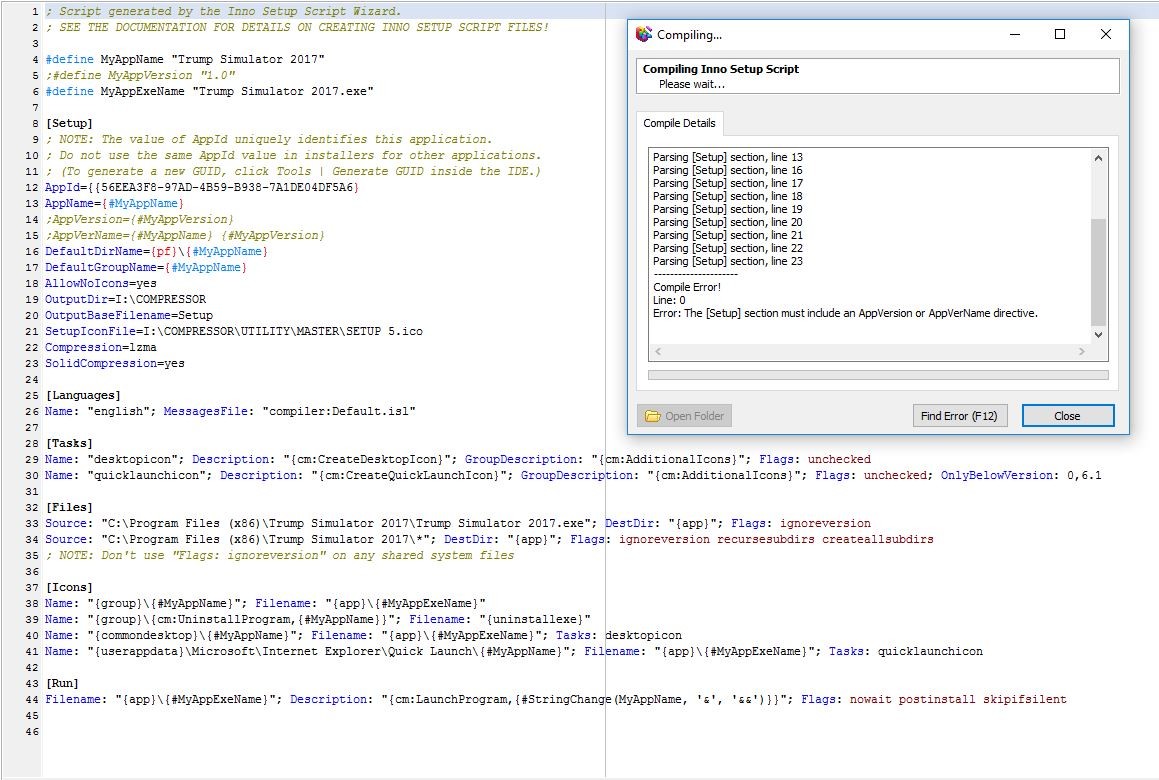
Rinaldo, I thanked you for making it but I did not. I do not get the mistakes like the picture, what I do wrong ...

Reply With Quote
Reply


Posting Rules
You may not post new threads
You may not post replies
You may not post attachments
You may not edit your posts

BB code is On
Smilies are On
[IMG] code is On
HTML code is Off

Forum Jump

Similar Threads
Thread Thread Starter Forum Replies Last Post
dvd playing problem... themis_t CD/DVD Software & Utilities 6 20-10-2004 13:44
Problem with Record Now Max ver 4.5 brkr101 PS2 Games 2 22-04-2004 21:40
problem with my xbox mrlucky XBox Games 1 11-01-2004 08:38
A problem about NFS Underground Gilvin PC Games 1 22-11-2003 21:17
Problem with pics on web pages and cookies EVOEvo CD/DVD-Writers 3 05-10-2003 17:57


All times are GMT -7. The time now is 03:00.


Powered by vBulletin® Version 3.8.11
Copyright ©2000 - 2026, vBulletin Solutions Inc.
FileForums @ https://fileforums.com