|
#1
 01-03-2017, 00:41
|
|||
|
|||
|
Shortcut problem
First I wish to work well.
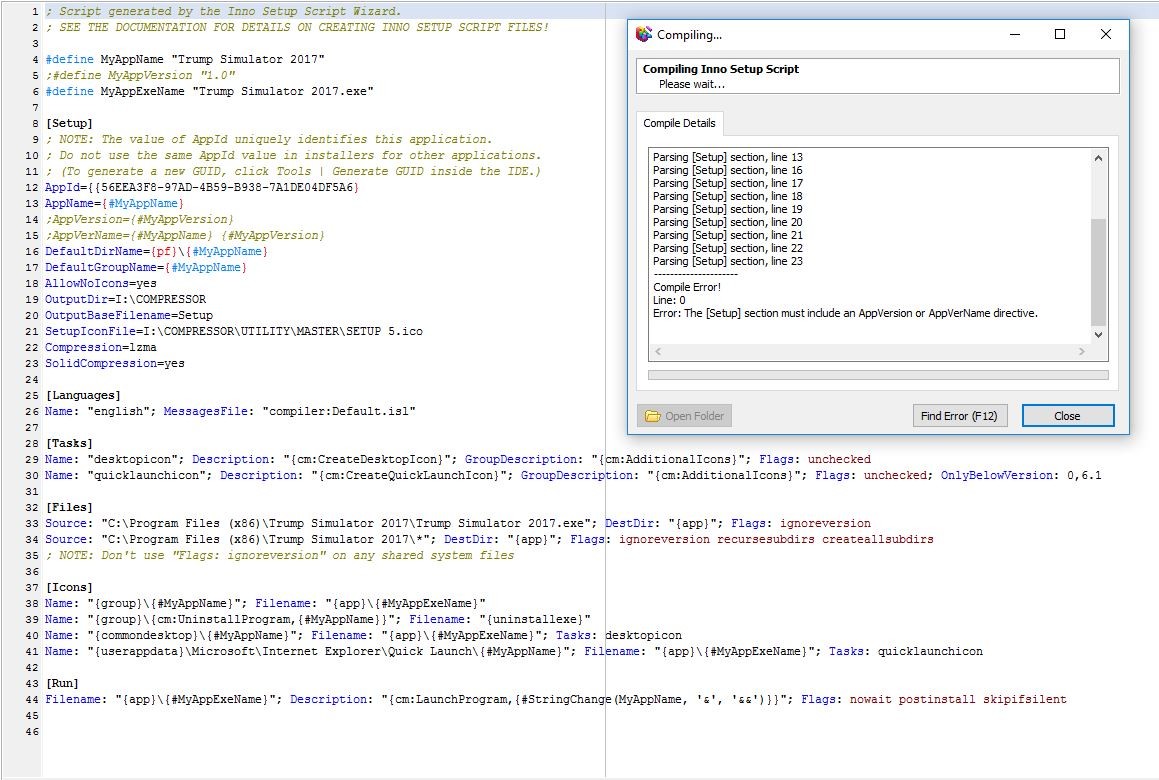
I am a beginner and I am preparing a setup file with Inno Setup Compiler and Innoide. I usually play games. But in some games I have a shortcut problem. Example: If you set up the GTA V game as a setup, the shortcut to the game is C: \ Program Files (x86) \ Grand Theft Auto V \ GTAVLauncher.exe. But if the shortcut is in another folder in the directory C: \ Program Files (x86) \ Grand Theft Auto V \ Bin \ GTAVLauncher.exe Such as the shortcut automatically installs into the directory is installed. Actually the game does not work because the shortcut needs to be in the bin file and it is in direct directory. I need help in this regard. I'm very happy if you can help. I hope I have succeeded in telling you. 
|
| Sponsored Links |
|
#2
01-03-2017, 00:49
|
||||
|
||||
|
Code:
#define MyAppName "My Program"
#define MyAppExeName "MyProg.exe"

[Setup]
AppName={#MyAppName}
AppVerName={#MyAppName}
DefaultDirName={pf}\{#MyAppName}
DefaultGroupName={#MyAppName}
OutputBaseFilename=setup

[Languages]
Name: "default"; MessagesFile: "compiler:Default.isl"

[Files]
Source: "MyProg.exe"; DestDir: "{app}\Bin"; Flags: ignoreversion

[Icons]
Name: "{commondesktop}\{#MyAppName}"; Filename: "{app}\Bin\{#MyAppExeName}";
Last edited by rinaldo; 01-03-2017 at 00:55.
|
|
#3
01-03-2017, 00:54
|
|||
|
|||
|
Quote:
I am very happy to be able to help you with where to add this line. Thank you.
|
|
#4
01-03-2017, 00:59
|
|||
|
|||
|
Quote:
|
|
#13
02-03-2017, 02:45
|
||||
|
||||
|
Code:
#define MyAppName "My Program"
#define MyAppVersion "1.5"
#define MyAppPublisher "My Company, Inc."
#define MyAppExeName "MyProg.exe"

[Setup]
AppId={{19A35D00-4028-45F0-813A-199F6D7FBEF1}
AppName={#MyAppName}
AppVersion={#MyAppVersion}
AppVerName={#MyAppName}
AppPublisher={#MyAppPublisher}
DefaultDirName={pf}\{#MyAppName}
DefaultGroupName={#MyAppName}
OutputBaseFilename=setup
Compression=lzma
SolidCompression=yes

[Languages]
Name: "default"; MessagesFile: "compiler:Default.isl"

[Tasks]
Name: "desktopicon"; Description: "{cm:CreateDesktopIcon}"; GroupDescription: "{cm:AdditionalIcons}";
Name: "quicklaunchicon"; Description: "{cm:CreateQuickLaunchIcon}"; GroupDescription: "{cm:AdditionalIcons}"; Flags: unchecked; OnlyBelowVersion: 0,6.1

[Icons]
Name: "{group}\{#MyAppName}"; Filename: "{app}\{#MyAppExeName}"
Name: "{commondesktop}\{#MyAppName}"; Filename: "{app}\{#MyAppExeName}"; Tasks: desktopicon
Remove All Code:
#define MyAppName "My Program"
;#define MyAppVersion "1.5"
;#define MyAppPublisher "My Company, Inc."
#define MyAppExeName "MyProg.exe"

[Setup]
AppName={#MyAppName}
;AppVersion={#MyAppVersion}
AppVerName={#MyAppName}
;AppPublisher={#MyAppPublisher}
DefaultDirName={pf}\{#MyAppName}
DefaultGroupName={#MyAppName}
OutputBaseFilename=setup
Compression=lzma
SolidCompression=yes

[Languages]
Name: "default"; MessagesFile: "compiler:Default.isl"

[Tasks]
Name: "desktopicon"; Description: "{cm:CreateDesktopIcon}"; GroupDescription: "{cm:AdditionalIcons}";
Name: "quicklaunchicon"; Description: "{cm:CreateQuickLaunchIcon}"; GroupDescription: "{cm:AdditionalIcons}"; Flags: unchecked; OnlyBelowVersion: 0,6.1

[Icons]
Name: "{group}\{#MyAppName}"; Filename: "{app}\{#MyAppExeName}"
Name: "{commondesktop}\{#MyAppName}"; Filename: "{app}\{#MyAppExeName}"; Tasks: desktopicon

[Code ]
procedure InitializeWizard();
begin
WizardForm.BorderStyle := bsDialog;
with WizardForm do begin Caption:='';
end;end;
Last edited by rinaldo; 02-03-2017 at 03:14.
|
|
#14
02-03-2017, 03:15
|
|||
|
|||
|
Quote:
|
 |
|
|
 Similar Threads
|
||||
| Thread | Thread Starter | Forum | Replies | Last Post |
| dvd playing problem... | themis_t | CD/DVD Software & Utilities | 6 | 20-10-2004 13:44 |
| Problem with Record Now Max ver 4.5 | brkr101 | PS2 Games | 2 | 22-04-2004 21:40 |
| problem with my xbox | mrlucky | XBox Games | 1 | 11-01-2004 08:38 |
| A problem about NFS Underground | Gilvin | PC Games | 1 | 22-11-2003 21:17 |
| Problem with pics on web pages and cookies | EVOEvo | CD/DVD-Writers | 3 | 05-10-2003 17:57 |



 Linear Mode

