|
#1
 31-03-2022, 07:17
|
||||
|
||||
 Death Stranding Director's Cut
Death Stranding Director's Cut [13xDVD5]
Credits: --CIU By:Yener90 --InstallerScript: CIU 3.0.0.1 b9 --Contributors:BAMsE; Razor12911; Simorq; KaktoR; Cesar82 CIU 3.0.0.1 --CLS-DiskSpan.dll R3 by Razor12911, modified version by Cesar82 --DiskSpan_GUI V2+ by Cesar82 Graphic found Ingame and Online Arts by mausschieber Info: Code:
---------------------------------------------------------------------------- ----------------------- CONVERSION DATE 30.08.2022 ------------------------- ---------------------------------------------------------------------------- 12:11:40 - You have chosen the DVD5 type for the media size. 12:11:40 - ISO images will not be created when conversion is complete. 12:11:40 - The computer will remain on when the conversion is complete. 12:11:40 - Selected ARC/DS method for Data1a-01.bin was: dst+dst_oo2reck+srep_new+4x4:b64mb:lzma:ultra:64m:bt4:fb273:lc8:mc1000000 12:11:40 - Selected ARC/DS method for Data1b-01.bin was: srep_new+4x4:b64mb:lzma:ultra:64m:bt4:fb273:lc8:mc1000000 12:11:40 - Selected ARC/DS method for Data1c-01.bin was: srep_new+1 ---------------------------------------------------------------------------- 12:11:41 - Compression initialized in 30.08.2022 at 12:11:41. 12:11:41 - Executing external file (Call Before)... 12:11:49 - Starting Data1a-01.bin archive creation. 15:24:30 - Moving Data1a-01.bin » Data1a-09.bin files to media folder. 15:24:31 - Starting Data1b-01.bin archive creation. 15:25:25 - Moving Data1b-01.bin file to media folder. 15:25:25 - Starting Data1c-01.bin archive creation. 15:34:15 - Moving Data1c-01.bin » Data1c-05.bin files to media folder. 15:34:15 - Compression finished in 30.08.2022 at 15:34:15. ----------------------------------------------------------------------------- 15:34:15 - Getting size of the game: Death Stranding 15:34:15 - » Installation folder size: 63,92 GB 15:34:15 - » Data1a-01.bin file size: 37,97 GB 15:34:15 - » Data1b-01.bin file size: 424,40 MB 15:34:15 - » Data1c-01.bin file size: 16,07 GB 15:34:15 - » Compressed game size: 54,45 GB (Ratio 85.18%) ----------------------------------------------------------------------------- 15:34:15 - Overall input size: 63,92 GB 15:34:15 - Overall output size: 54,45 GB (Ratio 85.18%) 15:34:15 - Overall conversion time: 03:22:34 15:34:15 - Overall conversion discs: 13 DVD5 ----------------------------------------------------------------------------- Code:
Version 1.0.0
- Initial Release  (90 views before);
Version 1.0.1
- SmallInstaller Corrected   (200 views before);
Version 1.0.2
- Conversion Updated to New Script and DSG;
Include: All DLC's Instructions: 1.-- Install Game, update to latest version + No-DVD. 2.-- Download the Conversion and extract to HD, (not in game folder) 2a.- Move _CommonRedist to Conversion output folder. (Last DVD) Code:
[Launch1]
-----------------------------------------------------
Name=Microsoft Visual C++ 2019
Exe1={src}\_CommonRedist\vcredist\2019\vcredist_x86.exe
Exe2={src}\_CommonRedist\vcredist\2019\vcredist_x64.exe
Argument=/passive /norestart
BeforeInstall=0
Checked=0
4.-- Test the conversion, before burning ISO.
__________________
It would be nice if you appreciate my work with the thanks Button Last edited by mausschieber; 20-04-2023 at 09:50. Reason: Conversion Updated to New Script and DSG 
|
| The Following 6 Users Say Thank You to mausschieber For This Useful Post: | ||
Gehrman (01-04-2022), Gls74 (01-04-2022), Jarmen_Kell (04-09-2022), ostallica89 (31-08-2022), Prettyboy099 (31-03-2022), Stveboss (31-03-2022) | ||
| Sponsored Links |
|
#2
29-08-2022, 01:17
|
|||
|
|||
|
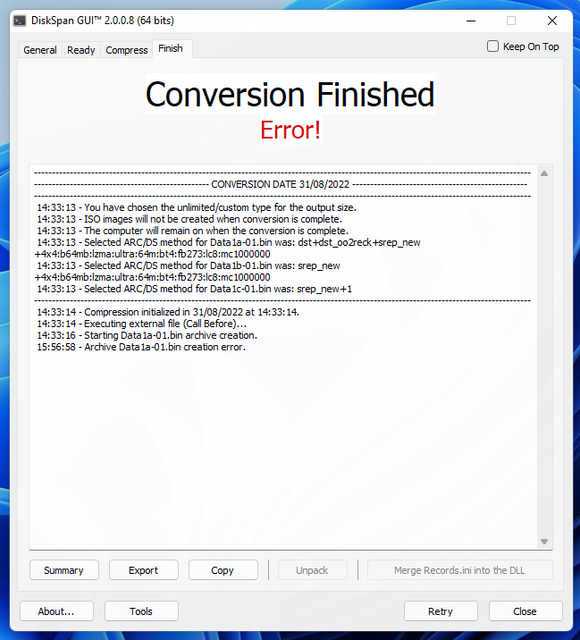
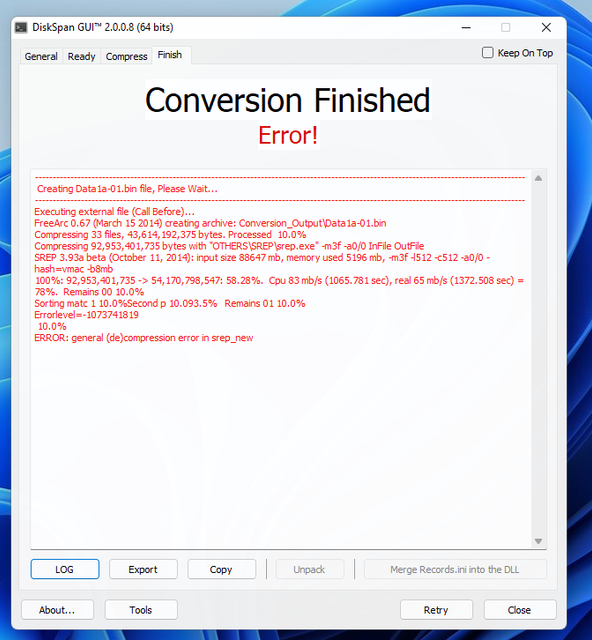
Anyone can help me, how to change srep v3.2 in this conversion? Alredy download srep v3.2 from Masquerade post and delete srep.exe in folder Resources\OTHERS\SREP and put srep-3.2.exe and try compress again still get error in srep. Thank you

|
|
#4
29-08-2022, 01:34
|
|||
|
|||
|
Quote:

|
|
#6
29-08-2022, 02:31
|
|||
|
|||
|
Quote:
|
|
#7
29-08-2022, 02:36
|
||||
|
||||
|
In command line.
Select the method you want to use and edit the srep part in DSG window, something like this Code:
dst+dst_oo2reck+srep:options here+lzma/lolz
__________________
Haters gonna hate
|
| The Following User Says Thank You to KaktoR For This Useful Post: | ||
mausschieber (29-08-2022) | ||
|
#8
29-08-2022, 09:44
|
||||
|
||||
|
Quote:
__________________
It would be nice if you appreciate my work with the thanks Button
|
|
#9
29-08-2022, 10:23
|
|||
|
|||
|
Quote:
|
|
#10
29-08-2022, 13:09
|
||||
|
||||
|
Quote:
post please the method so i can check the Conversion myself but i have to download first
__________________
It would be nice if you appreciate my work with the thanks Button
|
|
#12
29-08-2022, 20:52
|
|||
|
|||
|
Quote:
|
|
#14
30-08-2022, 08:04
|
||||
|
||||
|
I Tested the Compress Method from Database and it worked Perfect
here are the Result
__________________
It would be nice if you appreciate my work with the thanks Button
|
|
#15
31-08-2022, 03:07
|
|||
|
|||
|
Quote:
|
 |
|
|
 Similar Threads
|
||||
| Thread | Thread Starter | Forum | Replies | Last Post |
| Best Compression Methods for 'Specific' Games. Q&A | JustFun | Conversion Tutorials | 4759 | Today 02:12 |
| INDEX - CD2DVD Conversion Index **UPDATED: 17-07-2024** | Grumpy | PC Games - CD/DVD Conversions | 252 | 16-07-2024 21:35 |
| Death Stranding Decryption Tool | Razor12911 | Conversion Tutorials | 4 | 30-03-2022 14:37 |
| Death Stranding | Prettyboy099 | PC Games - CD/DVD Conversions | 44 | 05-11-2020 01:51 |
| Darksiders 2 Death Lives DVD9 to 2xDVD5 | senseman | PC Games - CD/DVD Conversions | 31 | 01-05-2016 10:50 |


 Linear Mode

