Go Back   FileForums > Game Backup > PC Games > PC Games - CD/DVD Conversions > Conversion Tutorials
Register FAQ Community Calendar Today's Posts Search

Reply
 
Thread Tools Search this Thread Display Modes
  #136  
Old 14-03-2017, 20:00
ZakirAhmad ZakirAhmad is offline
Registered User
 
Join Date: Sep 2015
Location: Kmr
Posts: 290
Thanks: 56
Thanked 58 Times in 37 Posts
ZakirAhmad is on a distinguished road
@L0v3craft:
Use ds4pzlib by razor...
just drop file on it and wait for result...
try to use switches like force detection headerless streams and chunksize.....
use chunksize to find chunksize u r going to use in pzlib...
additional info...
u can also see possible memory usage during preprocess by pzlib...
Reply With Quote
The Following 2 Users Say Thank You to ZakirAhmad For This Useful Post:
L0v3craft (15-03-2017), Razor12911 (15-03-2017)
Sponsored Links
  #137  
Old 15-03-2017, 17:29
Razor12911's Avatar
Razor12911 Razor12911 is offline
Noob
 
Join Date: Jul 2012
Location: South Africa
Posts: 3,749
Thanks: 2,170
Thanked 11,206 Times in 2,307 Posts
Razor12911 is on a distinguished road
Quote:
Originally Posted by felice2011 View Post
I would cut the thumb down to this user, but then it will be worse it will use the middle finger...
Haha, I don't know why he always does that, and I thought I was the only one who noticed.
Reply With Quote
  #138  
Old 17-03-2017, 02:07
-XCX-'s Avatar
-XCX- -XCX- is offline
Registered User
 
Join Date: Nov 2016
Location: In Any Planet
Posts: 60
Thanks: 121
Thanked 92 Times in 23 Posts
-XCX- is on a distinguished road
I repacked 35.6gb on Gta5+all dlcs.
Thanks a lot Razor12911 Bro for your library
Reply With Quote
The Following User Says Thank You to -XCX- For This Useful Post:
oltjon (17-03-2017)
  #139  
Old 17-03-2017, 06:56
Sebazz Sebazz is offline
Registered User
 
Join Date: Mar 2016
Location: Terra
Posts: 60
Thanks: 24
Thanked 7 Times in 6 Posts
Sebazz is on a distinguished road
Hello guys, can you please what is the pzlib best methods for phantom pain, rise of tomb raider and hitman 2016 ? Thanks
Reply With Quote
  #140  
Old 17-03-2017, 08:15
-XCX-'s Avatar
-XCX- -XCX- is offline
Registered User
 
Join Date: Nov 2016
Location: In Any Planet
Posts: 60
Thanks: 121
Thanked 92 Times in 23 Posts
-XCX- is on a distinguished road
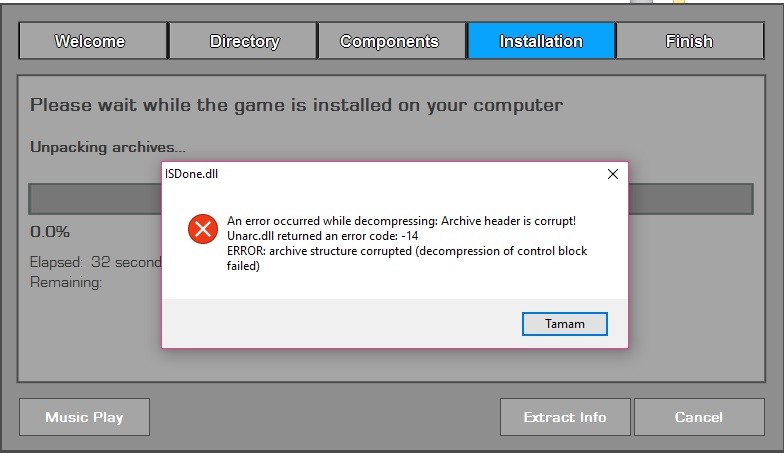
Please AnyOne Help Me

It took too much time to compress
then I got this fu**k**g error while unpacking any solution please
Method Used:
packcmd = pzlib e -m2 -x -c256m - -o - <stdin> <stdout>
Attached Images
File Type: png Screenshot (21).png (199.3 KB, 762 views)
File Type: png Screenshot (22).png (790.3 KB, 692 views)

Last edited by -XCX-; 17-03-2017 at 08:40.
Reply With Quote
  #141  
Old 17-03-2017, 09:12
Sebazz Sebazz is offline
Registered User
 
Join Date: Mar 2016
Location: Terra
Posts: 60
Thanks: 24
Thanked 7 Times in 6 Posts
Sebazz is on a distinguished road
i think you need specificate decoding/encoding streams option (-t#), try this config.

[External compressorzlib]
header = 0
packcmd = pZLib e -m2 -x -c256m -t75p $$arcdatafile$$.tmp -o $$arcpackedfile$$.tmp
unpackcmd = pZLib d -t75p - -o - <stdin> <stdout>
Reply With Quote
  #142  
Old 17-03-2017, 09:16
-XCX-'s Avatar
-XCX- -XCX- is offline
Registered User
 
Join Date: Nov 2016
Location: In Any Planet
Posts: 60
Thanks: 121
Thanked 92 Times in 23 Posts
-XCX- is on a distinguished road
Quote:
Originally Posted by Sebazz View Post
i think you need specificate decoding/encoding streams option (-t#), try this config.

[External compressorzlib]
header = 0
packcmd = pZLib e -m2 -x -c256m -t75p $$arcdatafile$$.tmp -o $$arcpackedfile$$.tmp
unpackcmd = pZLib d -t75p - -o - <stdin> <stdout>
did you try any time
Reply With Quote
  #143  
Old 18-03-2017, 21:08
ramazan19833 ramazan19833 is offline
Banned
 
Join Date: Apr 2012
Location: abc
Posts: 248
Thanks: 16
Thanked 10 Times in 8 Posts
ramazan19833 is on a distinguished road
Hello there

Hello there

Help Please..


GTA 5 ORIGINAL SIZE :[/B] 75 GB
GTA 5 COMPRESS : 37 GB
METHOD : -mpzlib+srep+lzma2


Arc.ini

[External compressorzlib]
header = 0
packcmd = pZLib e -m2 -x -c256m -t100p - -o - <stdin> <stdout>
unpackcmd = pZLib d -t100p - -o - <stdin> <stdout>

[External compressor:srep]
header = 0
packcmd = srep64 {options} -m3f -d1g -a2 $$arcdatafile$$.tmp $$arcpackedfile$$.tmp
unpackcmd = srep64 {options} -d -s - - <stdin> <stdout>

[External compressor:Lzma2]
header = 0
packcmd = 7z a -txz -an -mcrc=0 -m1=lzma2:d25:fb=273:mf=bt4:mc=1000000:lc=4:lp=0 -mmt=4 -mx9 -si -so <stdin> <stdout>
unpackcmd = 7z x -txz -an -y -si -so <stdin> <stdout>

pZLib+srep+Lzma2 38GB GTA V
Reply With Quote
  #144  
Old 19-03-2017, 01:40
ImmortalArc's Avatar
ImmortalArc ImmortalArc is offline
Registered User
 
Join Date: Nov 2016
Location: Santiago
Posts: 72
Thanks: 44
Thanked 9 Times in 4 Posts
ImmortalArc is on a distinguished road
Have you tried with wpi and asc??
__________________
Sharing is caring : immortal words..
Reply With Quote
  #145  
Old 19-03-2017, 09:55
L0v3craft's Avatar
L0v3craft L0v3craft is offline
Registered User
 
Join Date: Dec 2015
Location: Rome
Posts: 96
Thanks: 421
Thanked 24 Times in 15 Posts
L0v3craft is on a distinguished road
Quote:
Originally Posted by ramazan19833 View Post
[External compressor:srep]
header = 0
packcmd = srep64 {options} -m3f -d1g -a2 $$arcdatafile$$.tmp $$arcpackedfile$$.tmp
unpackcmd = srep64 {options} -d -s - - <stdin> <stdout>
Try to change that with this:

Code:
[External compressor:srep64]
header = 0
packcmd   = srep64 -m3f -d1g -a2 $$arcdatafile$$.tmp $$arcpackedfile$$.tmp
unpackcmd = srep64 -d -s -- <stdin> <stdout>
and change the command: pZLib+srep+Lzma2

with this: pZLib+srep64+Lzma2

Last edited by L0v3craft; 19-03-2017 at 09:57.
Reply With Quote
  #146  
Old 03-04-2017, 04:19
chum chum is offline
Registered User
 
Join Date: Jan 2015
Location: South America
Posts: 64
Thanks: 61
Thanked 10 Times in 8 Posts
chum is on a distinguished road
Pzlib compress MP3 too? Thats odd because Precomp045 cause issues trying to compress some MP3 files, when i disabled Precomp045 from compressing MP3 then the compression and decompression works perfect.

Pzlib crashes when try to compress same audio files than precomp045 crashes.
Reply With Quote
  #147  
Old 05-04-2017, 07:17
danswano danswano is offline
Registered User
 
Join Date: Feb 2013
Location: Luxm
Posts: 314
Thanks: 218
Thanked 27 Times in 22 Posts
danswano is on a distinguished road
Hello,
I' using these parameters on Mafia III
Quote:
;srepx64
[External compressor:srep]
header = 0
packcmd = srep64 {options} -m3f -d1g -a2 -v0 $$arcdatafile$$.tmp $$arcpackedfile$$.tmp

[External compressorzlib]
header = 0
packcmd = pZLib {options} e -m2 -c256m -t100p $$arcdatafile$$.tmp -o $$arcpackedfile$$.tmp
hif2raw_dll.dll and raw2hif_dll.dll are next to pzlib.exe in the same folder as well.

But getting data checksum error when decopressing, any idea why?

Last edited by danswano; 05-04-2017 at 07:23.
Reply With Quote
  #148  
Old 05-04-2017, 07:25
Gupta Gupta is offline
Banned
 
Join Date: Aug 2016
Location: https://t.me/pump_upp
Posts: 399
Thanks: 139
Thanked 715 Times in 231 Posts
Gupta is on a distinguished road
Send a message via ICQ to Gupta Send a message via AIM to Gupta Send a message via Yahoo to Gupta
>> But getting data checksum error when decopressing, any idea why?
don't use stdio/stdin while compressing, you will never get crc error
Tested 1000 times
Reply With Quote
  #149  
Old 05-04-2017, 07:26
danswano danswano is offline
Registered User
 
Join Date: Feb 2013
Location: Luxm
Posts: 314
Thanks: 218
Thanked 27 Times in 22 Posts
danswano is on a distinguished road
Can you modify my code please, not sure what you mean where i must remove them.
You mean completely remove it from both srep and pzlib or just pzlib?
Or you mean remove it from unapckcmd?

Last edited by danswano; 05-04-2017 at 09:15.
Reply With Quote
The Following User Says Thank You to danswano For This Useful Post:
ImmortalArc (06-04-2017)
  #150  
Old 06-04-2017, 11:48
danswano danswano is offline
Registered User
 
Join Date: Feb 2013
Location: Luxm
Posts: 314
Thanks: 218
Thanked 27 Times in 22 Posts
danswano is on a distinguished road
Any help is appreciated, tried many pzlib and srep settings and still getting so many freaking crc errors.
also tried splitting the files across multiple archives didn't work for all of them.
Reply With Quote
Reply


Posting Rules
You may not post new threads
You may not post replies
You may not post attachments
You may not edit your posts

BB code is On
Smilies are On
[IMG] code is On
HTML code is Off

Forum Jump

Similar Threads
Thread Thread Starter Forum Replies Last Post
Anno 1701 won't load, just get a blue screen! Shadow22 General Gaming 5 28-08-2012 12:52
CPU jumps up to 100% now, not before dav6 Software 11 24-05-2008 03:33
Elder Scrolls IV: Oblivion. WTF FOR ME. SansMercy General Gaming 5 07-04-2007 23:05
weird error.... sheykh PC Games 5 07-05-2006 20:23
Have someone the german final release of WinNT 5 (2000) SP2 luckystar PC Games 0 15-08-2001 12:11


All times are GMT -7. The time now is 07:34.


Powered by vBulletin® Version 3.8.11
Copyright ©2000 - 2026, vBulletin Solutions Inc.
FileForums @ https://fileforums.com