|
#1
 24-09-2026, 09:32
|
||||
|
||||
 CONTROL Resonant
CONTROL Resonant [?xDVD5]
Credits: --CIU By:Yener90 --InstallerScript: CIU 3.0.0.2 --Contributors:BAMsE; Razor12911; Simorq; KaktoR; Cesar82 CIU 3.0.0.2 --CLS-DiskSpan.dll R3 by Razor12911, modified version by Cesar82 --DiskSpan_GUI V2+ by Cesar82 Graphic found Ingame and Online Arts by mausschieber Version History: Code:
Version 1.0.0 - Initial Release ; Instructions: 1.-- Install Game, update to latest version + No-DVD. 2.-- Download the Conversion and extract to HD, (not in game folder) 2a.- Move _CommonRedist to Conversion output folder. (Last DVD) Code:
[Launch1]
-----------------------------------------------------------
Name=DirectX (Jun 2010)
Exe1={src}\_CommonRedist\DirectX\Jun2010\DXSETUP.exe
Argument=/silent
BeforeInstall=0
Checked=0

[Launch2]
-----------------------------------------------------
Name=Microsoft Visual C++ 2022
Exe1={src}\_CommonRedist\vcredist\2022\VC_redist.x86.exe
Exe2={src}\_CommonRedist\vcredist\2022\VC_redist.x64.exe
Argument=/passive /norestart
BeforeInstall=0
Checked=0
4.-- Test the conversion, before burning ISO.
__________________
It would be nice if you appreciate my work with the thanks Button Last edited by mausschieber; Today at 12:04. Reason: Added Setup with CMD Commands 
|
| The Following 3 Users Say Thank You to mausschieber For This Useful Post: | ||
| Sponsored Links |
|
#2
24-09-2026, 17:18
|
|||
|
|||
|
------------------------------------------------------------------------------------------
------------------------------- CONVERSION DATE 2026/09/24 ------------------------------- ------------------------------------------------------------------------------------------ 22:46:03 - You have chosen the BD50 type for media size. 22:46:03 - ISO images will not be created when conversion is complete. 22:46:03 - The computer will remain on when the conversion is complete. 22:46:03 - Selected ARC/DS method for Data1a-01.bin was: xt_zlib+srep_new+lzma2:d96m:fb273:lc4:mc1000000 ------------------------------------------------------------------------------------------------------- 22:46:05 - Compression initialized in 24/09/2026 at 22:46:05. 22:46:05 - Starting Data1a-01.bin archive creation. 01:20:35 - Moving Data1a-01.bin » Data1a-02.bin files to media folder. 01:20:35 - Compression finished in 25/09/2026 at 01:20:35. ------------------------------------------------------------------------------------------------------- 01:20:35 - Getting size of the game: CONTROL Resonant 01:20:35 - » Installation folder size: 104.53 GB 01:20:35 - » Compressed game size: 77.94 GB (Ratio 74.56%) ------------------------------------------------------------------------------------------------------- 01:20:35 - Overall input size: 104.53 GB 01:20:35 - Overall output size: 77.94 GB (Ratio 74.56%) 01:20:35 - Overall conversion time: 02:34:30 01:20:35 - Overall conversion discs: 2 BD50 ------------------------------------------------------------------------------------------------------- Redone faster and also installs faster as other took more than hour this under 30 minutes but no on screen icon for it but not problem take from folder anyway.. ------------------------------------------------------------------------------------------ ------------------------------- CONVERSION DATE 2026/09/26 ------------------------------- ------------------------------------------------------------------------------------------ 09:15:31 - You have chosen the BD50 type for media size. 09:15:31 - ISO images will not be created when conversion is complete. 09:15:31 - The computer will shut down when the conversion is complete. 09:15:31 - Selected ARC/DS method for Data1a-01.bin was: xtool:dd3:l10,d128mb 09:15:31 - Selected ARC/DS method for Data1b-01.bin was: xt_lz4+xtool:dd3:l10,d128mb ------------------------------------------------------------------------------------------------------- 09:15:32 - Compression initialized in 26/09/2026 at 09:15:32. 09:15:32 - Starting Data1a-01.bin archive creation. 10:11:41 - Moving Data1a-01.bin » Data1a-02.bin files to media folder. 10:11:41 - Starting Data1b-01.bin archive creation. 10:11:42 - Moving Data1b-01.bin file to media folder. 10:11:42 - Compression finished in 26/09/2026 at 10:11:42. ------------------------------------------------------------------------------------------------------- 10:11:42 - Getting size of the game: CONTROL Resonant 10:11:42 - » Installation folder size: 104.50 GB 10:11:42 - » Data1a-01.bin file size: 78.12 GB 10:11:42 - » Data1b-01.bin file size: 264 BY 10:11:42 - » Compressed game size: 78.12 GB (Ratio 74.76%) ------------------------------------------------------------------------------------------------------- 10:11:42 - Overall input size: 104.50 GB 10:11:42 - Overall output size: 78.12 GB (Ratio 74.76%) 10:11:42 - Overall conversion time: 00:56:09 10:11:42 - Overall conversion discs: 2 BD50 ------------------------------------------------------------------------------------------------------- Last edited by Gillian; 26-09-2026 at 05:38.
|
| The Following User Says Thank You to Gillian For This Useful Post: | ||
mausschieber (25-09-2026) | ||
|
#3
Today, 05:54
|
|||
|
|||
|
Is there any suggested compression method?
|
|
#4
Today, 06:37
|
||||
|
||||
|
Quote:
__________________
It would be nice if you appreciate my work with the thanks Button
|
| The Following User Says Thank You to mausschieber For This Useful Post: | ||
Jarmen_Kell (Today) | ||
|
#5
Today, 08:06
|
|||
|
|||
|
I alredady used it and it was so unsatisfying that I really didn't want to publish the result.
Quote:

Last edited by Jarmen_Kell; Today at 08:09.
|
|
#6
Today, 08:26
|
||||
|
||||
|
https://fileforums.com/showpost.php?...&postcount=529
Choose no for wwise processing. This is for CIU setup.exe Code:
[CMDCommands]
@ECHO OFF
SETLOCAL EnableDelayedExpansion EnableExtensions
CD /D "{app}"
IF NOT EXIST "{app}\cr_bink.xtl" GOTO End
CLS
SET /A "FileList.Count=5"
SET "FileList[1].Name=base-generic-002.rmdblob
SET "FileList[2].Name=base-generic-004.rmdblob
SET "FileList[3].Name=stream0-generic-010.rmdblob
SET "FileList[4].Name=stream0-generic-012.rmdblob
SET "FileList[5].Name=stream0-generic-014.rmdblob
FOR /L %%i IN (1, 1, !FileList.Count!) DO IF EXIST "{app}\data_pack2\pc\!FileList[%%i].Name!" (
	CALL "{app}\XTool.exe" decode "{app}\cr_bink.xtl" "{app}\data_pack2\pc\!FileList[%%i].Name!_extract" "{app}\data_pack2\pc\!FileList[%%i].Name!"
	RD /S /Q "{app}\data_pack2\pc\!FileList[%%i].Name!_extract"
	ECHO.------------------------------------------------------------------------------------------------------
)
IF EXIST "{app}\XTool.exe" DEL /F /S /Q "{app}\XTool.exe"
IF EXIST "{app}\cr_bink.xtl" DEL /F /S /Q "{app}\cr_bink.xtl"
:End
ENDLOCAL
DEL "%~f0"
__________________
Haters gonna hate
Last edited by KaktoR; Today at 08:32.
|
| The Following User Says Thank You to KaktoR For This Useful Post: | ||
Jarmen_Kell (Today) | ||
|
#7
Today, 10:00
|
|||
|
|||
|
Quote:
I added that fix files and start. But it returnes error few moment after stast. 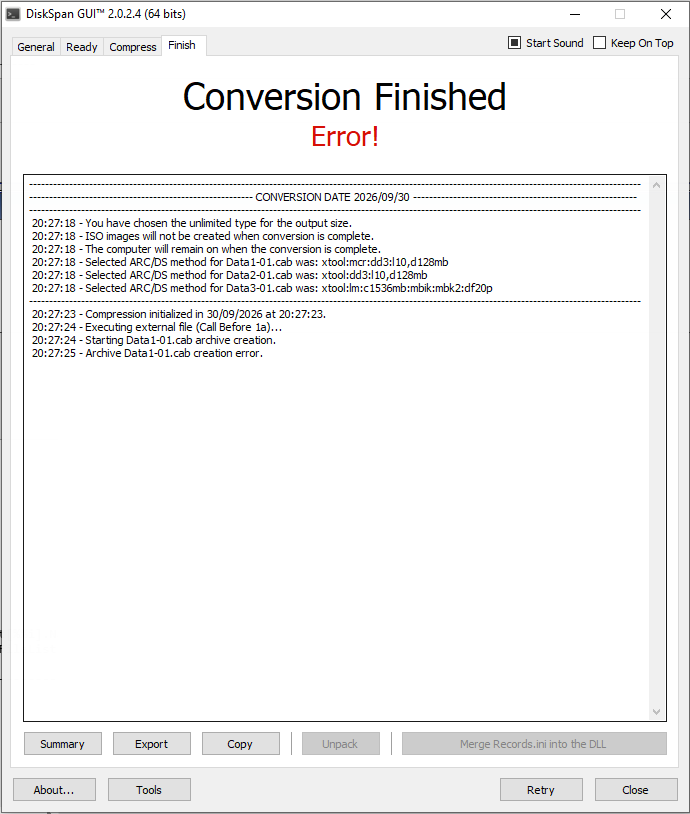
Last edited by Jarmen_Kell; Today at 10:31.
|
|
#8
Today, 11:20
|
|||
|
|||
|
It seemd this is the error:
Quote:
|
|
#9
Today, 12:05
|
||||
|
||||
|
Quote:
__________________
It would be nice if you appreciate my work with the thanks Button
|
| The Following User Says Thank You to mausschieber For This Useful Post: | ||
Jarmen_Kell (Today) | ||
|
#10
Today, 13:10
|
|||
|
|||
|
Thanks Bro, but the error is in compressing stage. (and still persists)
|
|
#11
Today, 15:34
|
||||
|
||||
|
Use latest DSG Beta (read the note at the bottom after changelog).
https://fileforums.com/showpost.php?...&postcount=526 Overwrite files with this https://fileforums.com/showpost.php?...&postcount=529 It works then. You can use Setup.exe from this conversion here.
__________________
Haters gonna hate
Last edited by KaktoR; Today at 15:36.
|
 |
| Thread Tools | Search this Thread |
| Display Modes | |
|
|
 Similar Threads
|
||||
| Thread | Thread Starter | Forum | Replies | Last Post |
| Control | mausschieber | PC Games - CD/DVD Conversions | 21 | 02-06-2026 19:52 |
| Time Shift NO Control on 1680X1050 ! | kane1999 | PC Games | 3 | 03-11-2008 14:40 |
| Ground Control 2 freeze | Peenuts | PC Games | 4 | 07-09-2004 05:37 |
| Total Club Manager 2004-Losing Pad control in Fusion mode | joeypesci | General Gaming | 3 | 31-12-2003 12:21 |
| Parental Control? | OralB | PS2 Games | 1 | 09-02-2002 06:59 |


 Linear Mode

