Go Back   FileForums > Game Backup > PC Games > PC Games - CD/DVD Conversions > Conversion Tutorials
Register FAQ Community Calendar Today's Posts Search

Reply
 
Thread Tools Search this Thread Display Modes
  #1  
Old 20-04-2017, 09:25
ChronoCross's Avatar
ChronoCross ChronoCross is offline
Registered User
 
Join Date: Sep 2014
Location: Acacia Dragons
Posts: 254
Thanks: 145
Thanked 203 Times in 115 Posts
ChronoCross is on a distinguished road
i was build this prepack for wav and raw(image).
is in c lang. but i cant fix to unpack. if anyone can help.
check the attach.
Attached Files
File Type: 7z prepack-master.7z (30.2 KB, 62 views)
Reply With Quote
Sponsored Links
  #2  
Old 03-03-2026, 15:12
kj911 kj911 is offline
Registered User
 
Join Date: Apr 2010
Location: world
Posts: 231
Thanks: 158
Thanked 88 Times in 62 Posts
kj911 is on a distinguished road
Quote:
Originally Posted by ChronoCross View Post
i was build this prepack for wav and raw(image).
is in c lang. but i cant fix to unpack. if anyone can help.
check the attach.
With the properly configured "arc.ini" file, it works fine.

Looking through GitHub's commits, I found, in one of them, the author's compiled binaries! There are no binaries available on the "prepack" main page or in the "Releases" branch.

The package you uploaded reflects the status as of 2016.03.12., if everything is correct. The package below, in principle, reflects the status as of 2016.03.10. and the "prepack.c" source code, if everything is correct, also contains the very first version from 2016.03.04. (it is in a separate small *.7z file, inside the larger 7z archive.)

Note: The compiled 32-bit EXE can be shrunk to under 20kB during compilation. With UPX, even further.

Arc.ini settings (from original authors posted EXE file, try edit its from used EXE name different):
Code:
[External compressor:prepack]
header = 0
packcmd   = "x64-prepack.exe" e $$arcdatafile$$.tmp $$arcpackedfile$$.tmp
unpackcmd = "x64-prepack.exe" d $$arcpackedfile$$.tmp $$arcdatafile$$.tmp
The filters, works from *.wav/others audio/few data files. (*.mpg files tested, 0 byte gain.) Technically very lightweight category compared from FreeArc delta/tor,etc.. filters.
Attached Files
File Type: txt prepack_test.txt (6.4 KB, 0 views)
File Type: 7z prepack_b3b4835_commit.7z (66.9 KB, 4 views)

Last edited by kj911; 06-03-2026 at 05:54. Reason: attachment/few info added
Reply With Quote
The Following User Says Thank You to kj911 For This Useful Post:
Carldric Clement (04-03-2026)
  #3  
Old 20-04-2017, 09:29
Bulat Bulat is offline
Registered User
 
Join Date: May 2016
Location: Moscow
Posts: 63
Thanks: 26
Thanked 50 Times in 27 Posts
Bulat is on a distinguished road
freearc contains tta 3.2 which afaik compress better but slower than 3.4

so it's better to run freearc/fazip itself rather than use tta executables

and compression time probably isn't important for repacks, only dec. speed and ratio matters. check all 3 levels - from tta:m1 to tta:m3

Last edited by Bulat; 20-04-2017 at 22:14.
Reply With Quote
The Following 5 Users Say Thank You to Bulat For This Useful Post:
Carldric Clement (23-06-2019), felice2011 (20-04-2017), JRD! (20-04-2017), romulus_ut3 (20-04-2017), shazzla (21-04-2017)
  #4  
Old 25-04-2017, 10:25
Carldric Clement's Avatar
Carldric Clement Carldric Clement is offline
Registered User
 
Join Date: Aug 2014
Location: Toboh, Sabah, Malaysia
Posts: 595
Thanks: 599
Thanked 656 Times in 233 Posts
Carldric Clement is on a distinguished road
OK Guys... if you want to know about TTA and wavpack are same but was almost different.

TTA is smooth compression and lightning style. but the level was not to fit loss to combine before and after.

wavpack is slow compression and support algorithm with a huge calculate. but the level was good to fit. almost not fit or whatever combine before and after.

see?? it just same.
Reply With Quote
  #5  
Old 26-05-2017, 22:16
rayated's Avatar
rayated rayated is offline
Registered User
 
Join Date: Apr 2017
Location: Bagladesh
Posts: 15
Thanks: 3
Thanked 30 Times in 7 Posts
rayated is on a distinguished road
Can anyone give me wavpack 5.1's pack and unpackcmd?
__________________
Think twice
Reply With Quote
  #6  
Old 27-05-2017, 10:04
JRD!'s Avatar
JRD! JRD! is offline
Registered User
 
Join Date: Sep 2015
Location: Matrix
Posts: 274
Thanks: 225
Thanked 600 Times in 168 Posts
JRD! is on a distinguished road
You can replace {compressor} with the name of the executable

"-h -x5 -q" are additional parameters...
Attached Images
File Type: jpg wavpack.jpg (76.0 KB, 345 views)
Attached Files
File Type: 7z wavpack.7z (260 Bytes, 82 views)
__________________
Practice makes perfect.
Reply With Quote
The Following 4 Users Say Thank You to JRD! For This Useful Post:
78372 (27-05-2017), Bulat (27-05-2017), ffmla (25-06-2019), Simorq (27-05-2017)
  #7  
Old 27-05-2017, 19:32
rayated's Avatar
rayated rayated is offline
Registered User
 
Join Date: Apr 2017
Location: Bagladesh
Posts: 15
Thanks: 3
Thanked 30 Times in 7 Posts
rayated is on a distinguished road
Quote:
Originally Posted by JRD! View Post
You can replace {compressor} with the name of the executable

"-h -x5 -q" are additional parameters...
btw whats the unpackcmd?
What if I use hybrid?
__________________
Think twice
Reply With Quote
  #8  
Old 23-06-2019, 17:48
Carldric Clement's Avatar
Carldric Clement Carldric Clement is offline
Registered User
 
Join Date: Aug 2014
Location: Toboh, Sabah, Malaysia
Posts: 595
Thanks: 599
Thanked 656 Times in 233 Posts
Carldric Clement is on a distinguished road
Quote:
Originally Posted by rayated View Post
btw whats the unpackcmd?
What if I use hybrid?
You can use with hybrid. Anyway try it.
Reply With Quote
The Following User Says Thank You to Carldric Clement For This Useful Post:
shiyamrrc (24-06-2019)
  #9  
Old 16-10-2021, 14:38
kj911 kj911 is offline
Registered User
 
Join Date: Apr 2010
Location: world
Posts: 231
Thanks: 158
Thanked 88 Times in 62 Posts
kj911 is on a distinguished road
Quote:
Originally Posted by JRD! View Post
You can replace {compressor} with the name of the executable

"-h -x5 -q" are additional parameters...
Works from ONE WAV-file compression. Multiple WAV compression not handle properly via switches and Arc.exe its crashed. Manually updating arc file use one WAV file its added again and again its very impossible.

More methods, use separated WAV->WV compression and put all *.WV file to one archive its works! See te attached packages. Required properly encoded WAV source files from during compression. The "MISSING FILES" directory contain three uncompressible, damaged WAV's not compressing the MSTS game files sets. (4998 file its work via 5001 files set. CRCs it OK!)

Mini compare (from my big test):

WAVPACK 4.80.0 x86 with "-hh -x6" + FreeArc 0.67 with "-mx" switches:
Results: 674 635kB (FreeArc temporary file: 673 358kB)**
with -mrep:512m switches: 673 414kB
Comp. time: ~155+20min; Decomp. time: ~10min

WAVPACK 4.80.0 x86 with "-f" + FreeArc 0.67 with "-mx" switches:
Results: 674 635kB (FreeArc temporary file: 709 262kB)**
with -mrep:512m switches: 711 083kB**
Comp. time: ~10+20min; Decomp. time: ~10min!

**Missing 3 files!!! Yes, don't use LZMA compression!

MSC+SREP: 634861kB (In last time.)

UPDATE: New results are posted it --> https://fileforums.com/showpost.php?...postcount=2597
Attached Files
File Type: rar WAVPACK_Losssless_[WAV_Compression_Only].rar (1.61 MB, 45 views)

Last edited by kj911; 17-10-2021 at 14:37. Reason: Added link from new results
Reply With Quote
The Following User Says Thank You to kj911 For This Useful Post:
Carldric Clement (18-10-2021)
  #10  
Old 24-10-2021, 08:26
Carldric Clement's Avatar
Carldric Clement Carldric Clement is offline
Registered User
 
Join Date: Aug 2014
Location: Toboh, Sabah, Malaysia
Posts: 595
Thanks: 599
Thanked 656 Times in 233 Posts
Carldric Clement is on a distinguished road
Quote:
Originally Posted by kj911 View Post
Works from ONE WAV-file compression. Multiple WAV compression not handle properly via switches and Arc.exe its crashed. Manually updating arc file use one WAV file its added again and again its very impossible.

More methods, use separated WAV->WV compression and put all *.WV file to one archive its works! See te attached packages. Required properly encoded WAV source files from during compression. The "MISSING FILES" directory contain three uncompressible, damaged WAV's not compressing the MSTS game files sets. (4998 file its work via 5001 files set. CRCs it OK!)

Mini compare (from my big test):

WAVPACK 4.80.0 x86 with "-hh -x6" + FreeArc 0.67 with "-mx" switches:
Results: 674 635kB (FreeArc temporary file: 673 358kB)**
with -mrep:512m switches: 673 414kB
Comp. time: ~155+20min; Decomp. time: ~10min

WAVPACK 4.80.0 x86 with "-f" + FreeArc 0.67 with "-mx" switches:
Results: 674 635kB (FreeArc temporary file: 709 262kB)**
with -mrep:512m switches: 711 083kB**
Comp. time: ~10+20min; Decomp. time: ~10min!

**Missing 3 files!!! Yes, don't use LZMA compression!

MSC+SREP: 634861kB (In last time.)

UPDATE: New results are posted it --> https://fileforums.com/showpost.php?...postcount=2597
Here's the arc setting useful.
Code:
[External compressor:wavpack]
header = 0
packcmd   = wavpack.exe -hh - $$arcpackedfile$$.tmp <stdin>
unpackcmd = wvunpack.exe - - <stdin> <stdout>
solid = 0
The only works by using one method. No need to add srep or lzma.
Code:
Compressed 5 files, 5,459,330 => 947,119 bytes. Ratio 17.35%                                                            
Compression time: cpu 0.02 sec/real 1.28 sec = 1%. Speed 4.25 mB/s                                                      
All OK
Attached Images
File Type: jpg Screenshot 2021-10-24 232530.jpg (99.6 KB, 144 views)
File Type: jpg Screenshot 2021-10-24 232612.jpg (146.0 KB, 144 views)
Reply With Quote
  #11  
Old 25-10-2021, 12:11
kj911 kj911 is offline
Registered User
 
Join Date: Apr 2010
Location: world
Posts: 231
Thanks: 158
Thanked 88 Times in 62 Posts
kj911 is on a distinguished road
Carldric! Use very higher files sets from compression! Works?? (Testing now in few hours.)

Found the BUG! See the pictures. YES! That was the problem. WvUnpack.exe glitch! 50-50 percentage its really to extract properly! Internally ARC file test its OK!


Tested from my 5001 WAV files sets. Don't work. The WAVPACK compressor no tolerance its incompressible, not standard and/or damaged WAV files. Found first error and compression progress exiting now with Errorlevel=1 message. This MSC and FreeArc with TTA-method tolerance any errors and will compress properly!

Compression error: https://i.kek.sh/723SkDDMPn5.png

Its probably fully proper switches from decompression:
Code:
unpackcmd = wvunpack.exe -z $$arcpackedfile$$.tmp $$arcdatafile$$.tmp
See picture: https://i.kek.sh/1OGVCcvdYsl.png

The "-z" switch its cosmetic usage from CMD Window title.

Last edited by kj911; 26-10-2021 at 04:29. Reason: Any new infos added
Reply With Quote
  #12  
Old 28-10-2021, 01:24
Carldric Clement's Avatar
Carldric Clement Carldric Clement is offline
Registered User
 
Join Date: Aug 2014
Location: Toboh, Sabah, Malaysia
Posts: 595
Thanks: 599
Thanked 656 Times in 233 Posts
Carldric Clement is on a distinguished road
Quote:
Originally Posted by kj911 View Post
Carldric! Use very higher files sets from compression! Works?? (Testing now in few hours.)

Found the BUG! See the pictures. YES! That was the problem. WvUnpack.exe glitch! 50-50 percentage its really to extract properly! Internally ARC file test its OK!
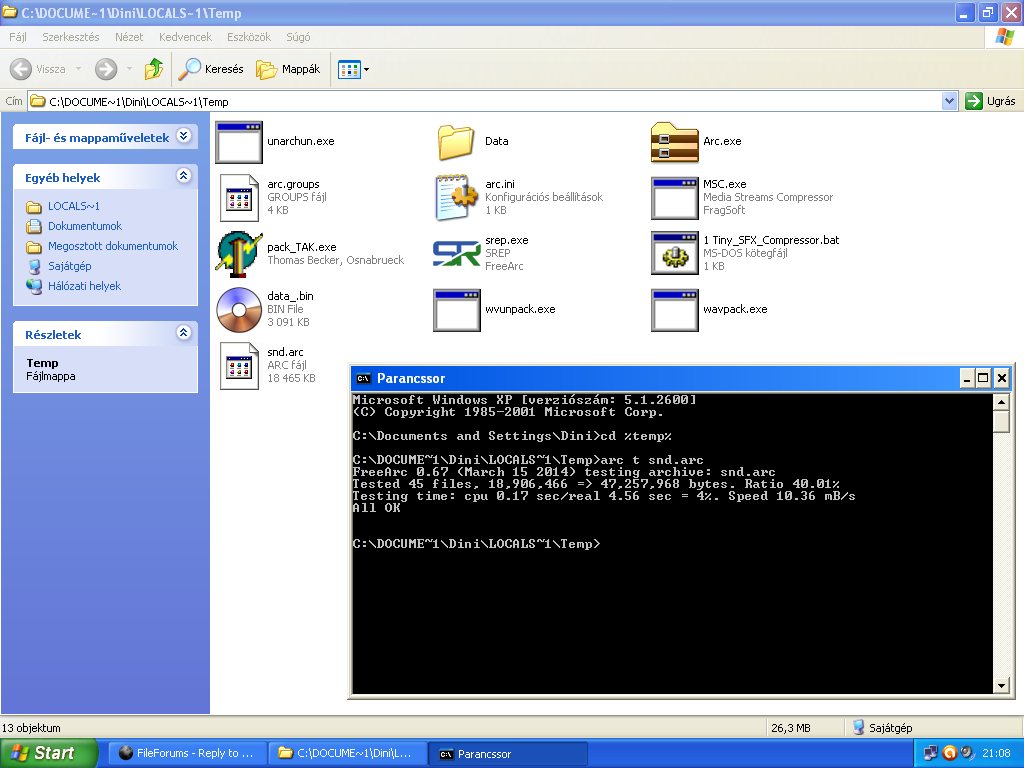


Tested from my 5001 WAV files sets. Don't work. The WAVPACK compressor no tolerance its incompressible, not standard and/or damaged WAV files. Found first error and compression progress exiting now with Errorlevel=1 message. This MSC and FreeArc with TTA-method tolerance any errors and will compress properly!

Compression error: https://i.kek.sh/723SkDDMPn5.png

Its probably fully proper switches from decompression:
Code:
unpackcmd = wvunpack.exe -z $$arcpackedfile$$.tmp $$arcdatafile$$.tmp
See picture: https://i.kek.sh/1OGVCcvdYsl.png

The "-z" switch its cosmetic usage from CMD Window title.
The third pic that I saw was like "Too many channels" right now. Maybe it was because the WAV encode was an unknown issue. I've tried to figure some other params without using "-hh" to make it work.

EDIT: Use "tta" method on FreeARC to compress a WAV files if it works.

Last edited by Carldric Clement; 28-10-2021 at 01:28.
Reply With Quote
  #13  
Old 28-10-2021, 12:23
kj911 kj911 is offline
Registered User
 
Join Date: Apr 2010
Location: world
Posts: 231
Thanks: 158
Thanked 88 Times in 62 Posts
kj911 is on a distinguished road
Carldric: It looks like we're pretty much done with this WavPack compression, with all its limitations.

Yes, TTA or MSC/TAK method its best and favorized methods usage in future time. Compression ratio and any results barely better then WavPack versions. Good luck.
Reply With Quote
The Following User Says Thank You to kj911 For This Useful Post:
Carldric Clement (29-10-2021)
  #14  
Old 05-03-2026, 00:40
shazzla shazzla is offline
Registered User
 
Join Date: Nov 2010
Location: Hunnia
Posts: 292
Thanks: 523
Thanked 102 Times in 78 Posts
shazzla is on a distinguished road
I think HALAC would be better. It outperforms all available lossless wav-packer algorithms. (in speed)
Compression ratio only a bit worse than others.
Real life example ,but it obviously depends on the source.

1.wav 58,245,620
1.flac 42,758,413 (max. compression)
1.tak 42,214,646
1.tta 42,339,162
1.halac 43,003,837

HALAC's compression time : 0.8 sec on Ryzen 7 9700x ,single thread.

Disadvantages : It has no stdio and stream processing feature.

Available at encode dot su ,look for Hakan Abbas.

Last edited by shazzla; 05-03-2026 at 02:00.
Reply With Quote
  #15  
Old 15-03-2026, 10:07
Carldric Clement's Avatar
Carldric Clement Carldric Clement is offline
Registered User
 
Join Date: Aug 2014
Location: Toboh, Sabah, Malaysia
Posts: 595
Thanks: 599
Thanked 656 Times in 233 Posts
Carldric Clement is on a distinguished road
Quote:
Originally Posted by shazzla View Post
I think HALAC would be better. It outperforms all available lossless wav-packer algorithms. (in speed)
Compression ratio only a bit worse than others.
Real life example ,but it obviously depends on the source.

1.wav 58,245,620
1.flac 42,758,413 (max. compression)
1.tak 42,214,646
1.tta 42,339,162
1.halac 43,003,837

HALAC's compression time : 0.8 sec on Ryzen 7 9700x ,single thread.

Disadvantages : It has no stdio and stream processing feature.

Available at encode dot su ,look for Hakan Abbas.
It looks like I can't compress all my project stuff song

Code:
[External compressor:halac]
header    = 0
packcmd   = "media\halac_e" $$arcdatafile$$.wav $$arcdatafile$$.halac -normal
unpackcmd = "media\halac_d" $$arcdatafile$$.halac $$arcdatafile$$.wav
datafile   = $$arcdatafile$$.wav
packedfile = $$arcdatafile$$.halac
solid = 0
MODERATORS please change the title: Suggestion codec to repack a wav file
Attached Images
File Type: png Screenshot 2026-03-16 020737.png (61.6 KB, 66 views)

Last edited by Carldric Clement; 15-03-2026 at 10:10.
Reply With Quote
Reply

Tags
algorithm, freearc, lossless sound


Posting Rules
You may not post new threads
You may not post replies
You may not post attachments
You may not edit your posts

BB code is On
Smilies are On
[IMG] code is On
HTML code is Off

Forum Jump

Similar Threads
Thread Thread Starter Forum Replies Last Post
altef_4's installer altef_4 Conversion Tutorials 244 24-05-2024 22:20
Need help with opus and freearc averanted Conversion Tutorials 6 29-07-2016 11:00
some kind of algorithm problem in freearc 0.67 rafikhan Conversion Tutorials 0 05-07-2014 03:02
GameCopyWorld Support forum FAQ; read before posting! RincewindTheWiz GameCopyWorld Support 1 10-10-2006 23:55
Emulators on the Xbox Skullleader XBox Games 15 07-04-2003 10:09


All times are GMT -7. The time now is 15:35.


Powered by vBulletin® Version 3.8.11
Copyright ©2000 - 2026, vBulletin Solutions Inc.
FileForums @ https://fileforums.com