Go Back   FileForums > Game Backup > PC Games > PC Games - CD/DVD Conversions > Conversion Tutorials

Reply
 
Thread Tools Search this Thread Display Modes
  #1  
Old 26-07-2022, 08:21
BLACKFIRE69's Avatar
BLACKFIRE69 BLACKFIRE69 is offline
Registered User
 
Join Date: Mar 2019
Location: In the Hell
Posts: 699
Thanks: 486
Thanked 2,603 Times in 572 Posts
BLACKFIRE69 is on a distinguished road
Quote:
Originally Posted by Gehrman View Post
Hi BLACKFIRE69
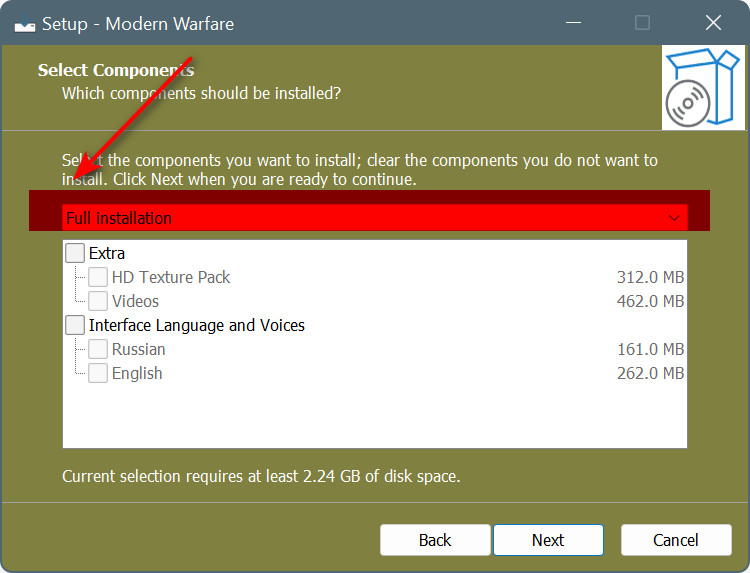
How to remove this section?
1. Comment the second line of [types] section.

Code:
[Types]
Name: full; Description: Full installation; Flags: iscustom
;Name: custom; Description: Custom installation;
2. Remove types from the [Components] section.
Code:
Before:

[Components]
Name: extra; Description: Extra; Types: full custom;
...
Name: voice; Description: Interface Language and Voices; Types: full;
...

After:

[Components]
Name: extra; Description: Extra;
...
Name: voice; Description: Interface Language and Voices;
...
.
Attached Images
File Type: png 1.png (7.8 KB, 1565 views)
Reply With Quote
The Following 2 Users Say Thank You to BLACKFIRE69 For This Useful Post:
ADMIRAL (27-07-2022), Gehrman (03-08-2022)
Sponsored Links
  #2  
Old 20-12-2022, 14:11
Masquerade Masquerade is offline
Registered User
 
Join Date: Jan 2020
Location: Monte d'Or
Posts: 1,217
Thanks: 294
Thanked 1,407 Times in 637 Posts
Masquerade is on a distinguished road
First of all, sorry for digging up this topic.

I have a small question about IsArcEx. If I wanted to run a batch file or other script after unpacking the FreeArc archive but also keep the elapsed timer running, whereabouts should I put the command?

All my post-FreeArc command run in a procedure called masquerade_work, so I call this after the FreeArc extraction finishes.

I have tried putting it on the line above IsArcExStop();, but this does not keep the timer running after the last archive has finished extracting:

Code:
for i:= 1 to ISArcExDiskCount do
  begin
    ISArcExError := not ISArcExExtract(i, ExpandConstant('{app}\'), ExpandConstant('{tmp}\arc.ini'), ExpandConstant('{app}'));
    if ISArcExError then break;
  end;
  until true;
  masquerade_work();
ISArcExStop;
Is there something I am doing incorrectly? The reason I would like to keep the elapsed timer running is because some of my scripts run for a long time after extracting data (recompressing, patching large files etc..) so it's important that the installer does not look stuck towards the user.

Thanks,
Masquerade
Reply With Quote
  #3  
Old 21-12-2022, 01:14
BLACKFIRE69's Avatar
BLACKFIRE69 BLACKFIRE69 is offline
Registered User
 
Join Date: Mar 2019
Location: In the Hell
Posts: 699
Thanks: 486
Thanked 2,603 Times in 572 Posts
BLACKFIRE69 is on a distinguished road
Quote:
Originally Posted by Masquerade View Post
First of all, sorry for digging up this topic.

I have a small question about IsArcEx. If I wanted to run a batch file or other script after unpacking the FreeArc archive but also keep the elapsed timer running, whereabouts should I put the command?

All my post-FreeArc command run in a procedure called masquerade_work, so I call this after the FreeArc extraction finishes.

I have tried putting it on the line above IsArcExStop();, but this does not keep the timer running after the last archive has finished extracting:

Code:
for i:= 1 to ISArcExDiskCount do
  begin
    ISArcExError := not ISArcExExtract(i, ExpandConstant('{app}\'), ExpandConstant('{tmp}\arc.ini'), ExpandConstant('{app}'));
    if ISArcExError then break;
  end;
  until true;
  masquerade_work();
ISArcExStop;
Is there something I am doing incorrectly? The reason I would like to keep the elapsed timer running is because some of my scripts run for a long time after extracting data (recompressing, patching large files etc..) so it's important that the installer does not look stuck towards the user.

Thanks,
Masquerade


@Masquerade

Timer will run until it calls ISArcExStop.


Code:
...

  masquerade_work();
  ISArcExStop;  // Timer Stops

...

Last edited by BLACKFIRE69; 03-04-2023 at 14:07.
Reply With Quote
The Following 2 Users Say Thank You to BLACKFIRE69 For This Useful Post:
Cesar82 (21-12-2022), Masquerade (21-12-2022)
Reply

Thread Tools Search this Thread
Search this Thread:

Advanced Search
Display Modes

Posting Rules
You may not post new threads
You may not post replies
You may not post attachments
You may not edit your posts

BB code is On
Smilies are On
[IMG] code is On
HTML code is Off

Forum Jump

Similar Threads
Thread Thread Starter Forum Replies Last Post
ASIS: Advanced Simple Installer Script KaktoR Conversion Tutorials 1477 20-05-2026 10:52
XTool 2020 (Plugins) Razor12911 Conversion Tutorials 405 24-12-2024 05:30
Game Installer Designer by altef_4 altef_4 Conversion Tutorials 236 28-05-2021 02:54
Best Compression For Archiving brispuss PC Games 12 03-01-2020 13:34
Compression Questions yasitha Conversion Tutorials 10 09-01-2019 12:29


All times are GMT -7. The time now is 05:56.


Powered by vBulletin® Version 3.8.11
Copyright ©2000 - 2026, vBulletin Solutions Inc.
FileForums @ https://fileforums.com